
A useful humanizing prompt does more than ask an AI tool to ‘sound human.’ It defines the reader, protects the meaning, identifies the writing problems to fix, and gives you a clear way to review the result. This guide gives you a reusable prompt and shows how to adapt it without filling your draft with artificial quirks or unnecessary mistakes.
A prompt to humanize AI text
Use the template below as a starting point. Replace the bracketed details with information about your audience, purpose, and preferred tone. The constraints are deliberately specific: they tell the model what must remain accurate as well as what should change.
Rewrite the text below so it reads like a clear, natural draft written for [audience].

Purpose: [what the reader should understand or do]
Tone: [conversational, professional, academic, direct, warm, or another specific tone]

While rewriting:
- Preserve every fact, name, number, quotation, technical term, and core claim.
- Remove repetitive ideas, generic transitions, and inflated wording.
- Vary sentence length and structure where it improves the rhythm.
- Prefer specific, direct language over vague claims.
- Keep the original point of view unless a change is requested.
- Do not invent examples, evidence, personal experiences, or sources.
- Do not add deliberate errors, slang, or unusual phrasing simply to appear human.

Return only the revised draft. After the draft, add a short “Review notes” list identifying any sentence whose meaning may need confirmation.

Text to rewrite:
[PASTE YOUR DRAFT HERE]
Treat this as an editing brief, not a magic phrase. Better source material and clearer constraints usually produce a better rewrite.
Why this humanizing prompt works
Short requests such as ‘make this sound human’ leave too many decisions undefined. The model may simplify facts, change the level of certainty, add a casual voice that does not suit the reader, or replace accurate terms with weaker synonyms. A structured prompt narrows those choices.
The template separates purpose, tone, protected information, and editing priorities. That gives the rewrite a target beyond being different. It also asks for review notes so you can identify wording that deserves a manual comparison with the source.
- Audience and purpose guide vocabulary, context, and formality.
- Protected details reduce accidental factual drift.
- Concrete editing instructions address rhythm, repetition, and clarity.
- A no-invention rule keeps the model from manufacturing authority.
How to use the prompt in three steps
First, identify what cannot change. Copy important facts, figures, names, quotations, product terms, and required keywords into a quick checklist. If the source makes a qualified claim, preserve that qualification rather than allowing the rewrite to sound more certain.
Second, describe a real reader and a practical outcome. ‘Busy operations managers choosing a reporting tool’ gives clearer direction than ‘professionals.’ Choose one tone that fits that reader instead of stacking conflicting instructions such as friendly, academic, persuasive, and casual.
Third, compare the rewrite with the source. Check each protected detail, read the result aloud, and edit sentences that sound too polished, too generic, or unlike your normal voice. The final pass should be yours.
Adapt the prompt for different types of writing
The core prompt can stay the same while the audience, purpose, tone, and constraints change. Add only the instructions that matter to the document in front of you.
- For an email, name the relationship and desired action. Ask for a direct opening and a clear next step.
- For a blog post, define the reader’s knowledge level and preserve headings, examples, citations, and target keywords.
- For academic writing, protect discipline-specific terms and citations. Request clarity and logical flow rather than informality.
- For marketing copy, specify the offer and approved claims. Do not allow the rewrite to invent benefits, proof, or customer results.
- For a personal statement, use AI only for editing language you wrote. Add your own memories, reasoning, and experience yourself.
A short before-and-after example
Source: ‘It is important to note that effective project communication plays a crucial role in ensuring that all team members are aligned with the overall objectives of the initiative.’
Rewritten: ‘Clear project communication keeps the team aligned on what the work needs to achieve.’
The revision removes the empty opening, replaces an inflated phrase with a direct verb, and keeps the original claim. It does not add a statistic, a personal anecdote, or a new promise. That is the standard a useful humanizing prompt should support.
Common prompt mistakes to avoid
Adding a long blacklist of supposedly robotic words often makes the output less natural. A word is not artificial on its own; repetition, vague meaning, and predictable structure are the larger problems. Likewise, asking for random errors or extreme burstiness can damage credibility and readability.
- Do not ask the model to guarantee that a detector will classify the result as human.
- Do not request invented opinions, experiences, quotations, or citations.
- Do not replace every original term with a synonym when the original is more precise.
- Do not combine several incompatible tones in one instruction.
- Do not publish the first output without comparing it with the source.
Review the humanized draft before publishing
A prompt can improve the quality of a second draft, but it cannot take responsibility for the final copy. Use the following check before you send or publish the text.
- Meaning: Does every claim still match the source?
- Accuracy: Are names, dates, numbers, quotations, and links unchanged and correct?
- Voice: Would you naturally use this level of formality and emphasis?
- Specificity: Have generic statements been replaced with evidence or examples you can support?
- Readability: Does the paragraph move clearly without repetitive openings or unnecessary setup?
- Original contribution: Have you added the judgment, experience, or context only you can provide?
Use the prompt with a text humanizer
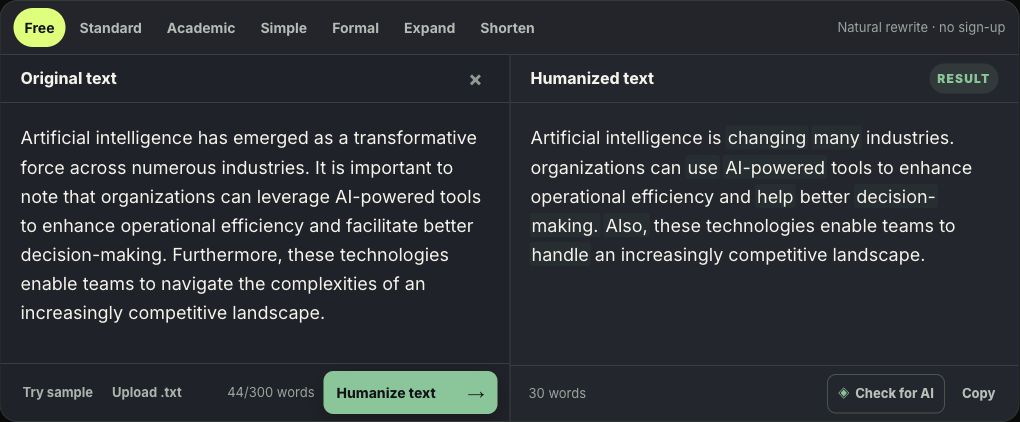
You can paste the source into the HumanizeText editor for a quick rewrite, then use the prompt principles in this guide as your review criteria. Start in Free mode, compare both versions, and keep the lines that genuinely improve clarity.
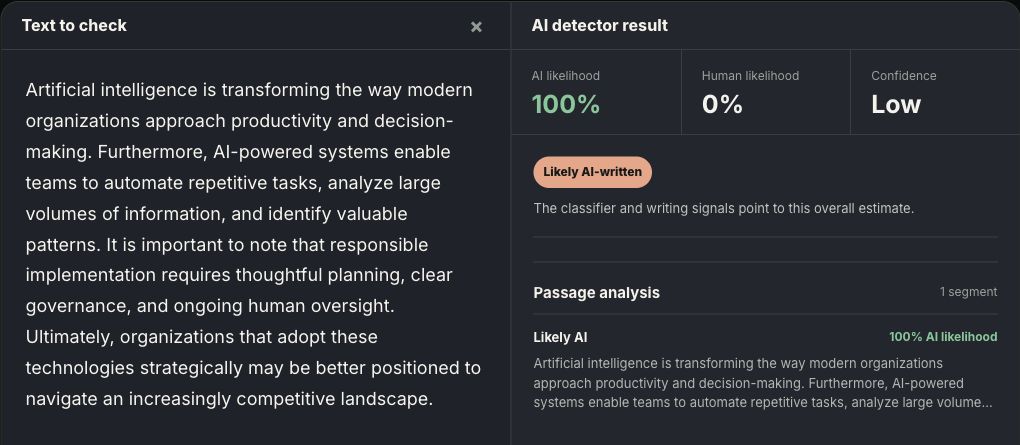
If you also use an AI detector, treat its result as one signal rather than proof of authorship. Detection scores can change with text length, topic, language, and model. Your factual review and editorial judgment remain more important than optimizing for a score.
Frequently asked questions
What is the best prompt to humanize AI text?
The best prompt identifies the audience, purpose, and tone; protects facts and key terms; asks for clearer rhythm and wording; and prohibits invented details. A structured editing brief is more reliable than a vague request to sound human.
Can a prompt make AI text undetectable?
No prompt can guarantee a particular AI-detector result. Detectors are probabilistic and can misclassify both human and AI-assisted writing. Focus on accuracy, clarity, original contribution, and a careful human review.
Should a humanizing prompt add mistakes or slang?
No. Deliberate mistakes usually reduce quality and can make the writing less credible. Natural writing comes from specific meaning, varied but controlled rhythm, an appropriate tone, and genuine human context.
Can I use the same prompt for essays, emails, and blog posts?
You can reuse the core structure, but change the audience, purpose, tone, protected details, and format requirements for each document. Academic writing, customer emails, and blog posts need different editorial constraints.